Complete Guide to Using the Coffee & Tea E-commerce Template: Best HTML Templates
Get started with the Coffee & Tea E-commerce template, one of the best HTML templates for shops. Step-by-step setup, design tips, and SEO to launch your store.
Launching an online store for coffee, tea, or related gourmet products demands a website that is as rich and inviting as the aromas you sell. The Coffee & Tea E-commerce template from HTMLY is designed to deliver exactly that experience — a visually stunning, fast-loading, and conversion-focused front-end. As one of the best HTML templates available, it gives you complete control over every line of code without the bloat of traditional website builders. Whether you're a small business owner, a freelancer crafting a client's site, or a developer looking for a solid foundation, this guide walks you through every step — from downloading the files to launching a polished, professional online store.
Why the Coffee & Tea Template Stands Out
HTMLY's Coffee & Tea E-commerce template is built with modern HTML5, CSS3, and vanilla JavaScript, making it exceptionally lightweight. Its design centres around warm, earthy colour palettes and elegant typography that naturally complement coffee and tea branding. But beyond aesthetics, it's engineered for performance and SEO — crucial factors in today's competitive online market. The responsive layout ensures your products look flawless on smartphones, tablets, and desktops, while the clean, semantic code makes it easy for search engines to understand your content. Choosing from the best HTML templates means you're not just getting a pretty face; you're getting a robust foundation that loads quickly and can be tailored to your unique vision without compromise.
Getting Started: Download and File Structure
After purchasing the template on HTMLY, you'll receive a .zip file. Extract it to reveal a well-organized folder structure:
- css/ — Stylesheets, often with main.css and responsive adjustments.
- js/ — JavaScript files for interactivity (menus, sliders, cart UI).
- images/ — Placeholder product photos, logos, and background graphics.
- fonts/ — Custom web fonts if any are included.
- index.html and additional page(s) (about, contact, product listing).
Open the entire folder in your favourite code editor (VS Code, Sublime Text, etc.) to start customising. The template is static HTML, so you don't need any server-side setup to preview changes — just double-click index.html to see the site in your browser.
Customizing the Look and Feel
Tweaking Colours and Fonts
The design already embraces a cosy, natural look, but you can make it your own. Most styling is defined in css/main.css. Look for CSS custom properties (variables) near the top of the file — often prefixed with --primary-color or --heading-font. Changing these central values instantly updates the entire site. For finer control, edit the specific selectors. If you prefer a Google Font, swap the import link in the HTML and update the font-family in the CSS. Remember to keep your brand consistent: use your logo's palette and choose fonts that reflect your shop's personality.
Replacing Images and Graphics
High-quality imagery sells products. Start by replacing the placeholder images in the images/ folder. Update the src attributes in the HTML accordingly. To maintain fast loading, optimise your photos with tools like TinyPNG or Squoosh before uploading. The template likely uses modern formats and lazy loading; check for loading="lazy" attributes on <img> tags and keep them for performance. If you have a hero banner or background image, ensure it scales well — the responsive CSS will handle it on different screens.
Editing Content and Text
Now comes the storytelling. Open index.html and scan for the header, taglines, about section, and footer. Replace the dummy text with your own compelling copy. Describe your coffee blends, tea origins, and brand story in a voice that resonates with your customers. Update contact details, business hours, and social media links. The template's heading structure (H1, H2, H3) is already SEO-friendly, so keep those tags but modify the text. Remember, clear and persuasive product descriptions boost conversions, so invest time here.
Adding Your Products
The heart of your e-commerce site is the product catalogue. The template provides a grid of product cards, each containing an image, title, price, and an "Add to Cart" button. To add a new product, duplicate an existing card block in the HTML and update the image, text, and link. Pay attention to the layout: the CSS grid or flexbox properties will automatically rearrange cards. If you need more than the default number, simply copy and paste. Make sure all images have descriptive alt attributes for accessibility and SEO.
For a more dynamic store, you can later integrate a backend or e-commerce platform, but the static HTML template already gives you a visually compelling storefront that you can host anywhere.
Optionally Integrating an E-commerce Backend
The Coffee & Tea E-commerce template is pure HTML, which means you have the freedom to choose how you handle transactions. Many small shops start with a simple Buy Now button linking to PayPal or Stripe payment links. Others embed a lightweight e-commerce solution like Snipcart (which turns any HTML site into a shopping cart) or use Shopify's Buy Button to manage inventory. For complete control, developers pair the template with a headless CMS and a static site generator. Whatever route you pick, the template's clean, semantic markup makes integration straightforward. If you prefer a template already bundled with a specific framework, browse HTMLY's ecommerce templates for more options.
Optimizing for Search Engines (SEO)
Even the best HTML templates need SEO fine-tuning to rank. Start with the <title> and <meta name="description"> tags in the <head> of each page. Incorporate your primary keywords naturally — for a coffee shop, terms like "artisan coffee,” “organic tea," and your location work well. Ensure every product image has a relevant alt text. Use clean URLs if you deploy with a custom domain. The template's fast-loading, mobile-friendly design already satisfies major search engine requirements, giving you a head start.
Performance Best Practices
Speed is non-negotiable. The template is already lightweight, but you can squeeze out more performance:
- Minify CSS and JS — Use online tools or build processes to remove unnecessary characters.
- Optimise images — Compress without losing quality, and serve modern formats like WebP where supported.
- Leverage browser caching — Set expiry headers for static assets via your hosting configuration or .htaccess.
- Remove unused code — Delete demo sections or scripts you don't need.
Test your site with Google PageSpeed Insights and Lighthouse to catch any issues before launch.
Testing and Going Live
Before you unveil your store, test thoroughly. Open the site in Chrome, Firefox, Safari, and Edge to confirm cross-browser compatibility. Use your phone and tablet to verify responsive behaviour — touch targets should be large enough, and text must be readable. Test all links, buttons, and form submissions. Once satisfied, upload the entire project folder to your web host via FTP (or deploy through a service like Netlify or Vercel for continuous deployment). Point your custom domain, and you're live!
Exploring Alternatives and Next Steps
The Coffee & Tea E-commerce template excels in its niche, but HTMLY offers a wide range of high-quality options for every industry. If you're considering a slightly different aesthetic, the Éclat Artisan Gourmet template, shown below, is another stellar example of a gourmet food template that combines elegance with speed. Its rich visuals and smooth animations can inspire your own customisations.
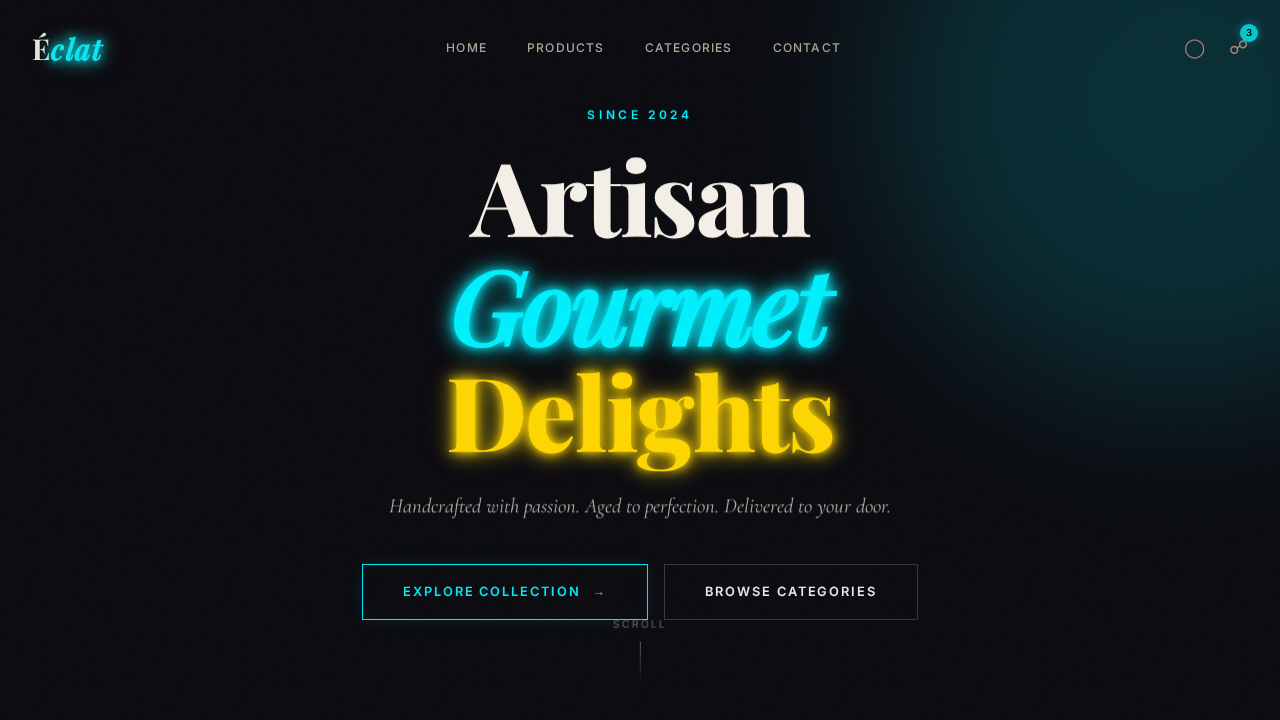
Whichever you choose, starting with one of the best HTML templates gives you a professional, conversion-optimised foundation. From here, keep your content fresh, monitor analytics, and gradually add features like email newsletter signups or customer reviews. With your new site, you're ready to pour a perfect digital experience for every visitor.