How to Master the Portrait Photographer Portfolio: Best HTML Templates for Photographers
Discover how to elevate your photography business with the Portrait Photographer Portfolio template, one of the best HTML templates for showcasing stunning visual work. Learn setup, customization, and SEO tips to build a compelling online presence.
Introduction: Why Your Portfolio Matters
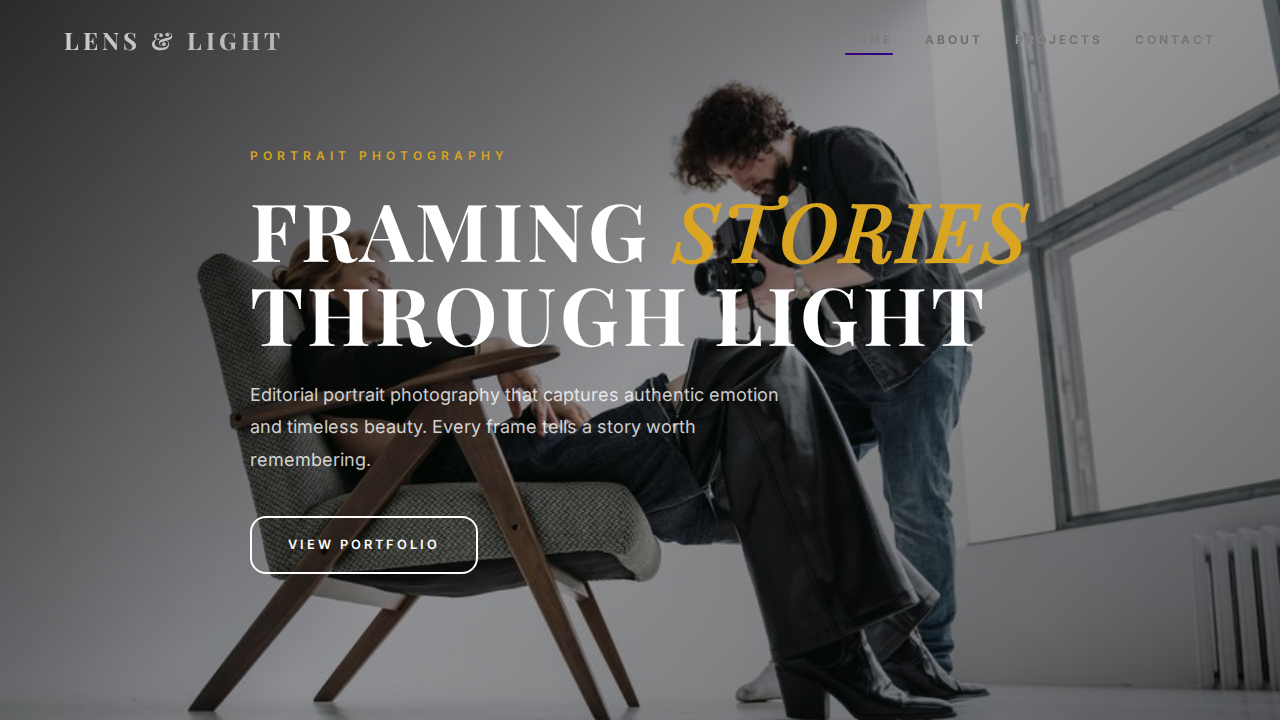
As a portrait photographer, your website is your digital storefront. It’s where potential clients judge your style, skill, and professionalism. A cluttered or slow site can turn them away, while a sleek, fast-loading portfolio draws them in. That’s where one of the best HTML templates comes into play. The Portrait Photographer Portfolio template from HTMLY is designed specifically to make your work the hero. In this guide, we’ll walk you through every step to get it live, customized, and optimized.
Why Choose the Portrait Photographer Portfolio Template?
With so many options available, picking the right foundation is critical. HTMLY specializes in best HTML templates that balance aesthetics with performance. This template stands out because:
- Image-First Design: Fullscreen hero sections and large gallery grids ensure your portraits captivate visitors instantly.
- Responsive and Retina-Ready: It looks flawless on phones, tablets, and desktops.
- Clean Code: Built with well-commented HTML5, CSS3, and vanilla JavaScript—easy to customize even if you’re not a pro coder.
- Speed Optimized: Minimal dependencies and lightweight assets mean fast load times, which helps both user experience and SEO.
- Ready-Made Sections: Includes an about page, contact form, and social media integration out of the box.
For photographers, a template that doesn’t distract from the imagery is essential. This template’s minimal chrome allows your portraits to speak for themselves, making it one of the best HTML templates for visual artists.
Key Features at a Glance
Gallery Layouts That Put Your Work Center Stage
The multipurpose gallery section supports both grid and masonry styles. You can mix portrait and landscape orientations without breaking the flow. Hover effects and optional lightbox previews add a polished feel.
Built-In Contact Form
No need for third‑party plugins. The contact form is ready to go—just point it to your email address in a single configuration line. It includes client‑side validation to reduce spam.
Blog-Ready Pages
While your portfolio is the focus, having a blog can boost your SEO. The template includes a styled blog section where you can share behind‑the‑scenes stories, tips, or recent shoots. Search engines love fresh content.
Social Proof and Testimonials
A dedicated testimonials slider lets you showcase client praise, which builds trust with new leads.
Setting Up the Template: A Step‑by‑Step Walkthrough
1. Download and Unpack
After purchasing or downloading from HTMLY, unzip the package. You’ll see a folder structure like this:
- index.html – the homepage
- css/ – style sheets
- js/ – scripts (lightbox, slider, etc.)
- img/ – placeholder images and icons
- blog.html, about.html, contact.html – additional pages
2. Preview Locally
Open index.html in your browser to see the demo content. This helps you understand the layout before you start editing.
3. Replace Images
Navigate to the img/ folder. Replace the placeholder photos with your own high‑resolution portraits. Keep file sizes small (use image compression tools like TinyPNG) to maintain fast load times. Update the src attributes in the HTML accordingly.
4. Edit Text and Personalize
Open index.html in a code editor (VS Code, Sublime Text, etc.). Change the hero heading, about blurb, gallery captions, and footer text. All content is clearly marked with comments.
5. Configure the Contact Form
In contact.html, find the form action attribute. Point it to your form‑handling service (e.g., Formspree, Netlify Forms) or your own backend. Most photographers use a simple service that emails submissions automatically.
Customizing the Design to Match Your Brand
Colors and Typography
The template uses CSS variables, making global changes a breeze. Look for :root in style.css and tweak:
- --primary-color: Accent color for buttons and links
- --secondary-color: Background tints or hover states
- --body-font: Default text font (Google Fonts link included)
Just replace the values with your brand palette. No need to hunt through hundreds of lines.
Navigation and Logo
Swap the logo placeholder with your own by editing the <img> tag in the header. Adjust the menu items to match your sections: Portfolio, About, Blog, Contact. The template’s smooth‑scroll behavior will still work if you keep the same href anchors.
Adding a Custom Domain
Once customized, upload the entire folder to your web host or deploy via platforms like Netlify, Vercel, or GitHub Pages. Point your domain’s DNS to the host and you’re live. HTMLY templates are static, so they can be hosted anywhere—no database needed.
Enhancing with Advanced Features (Without Breaking the Template)
One advantage of using best HTML templates is that they’re built with extensibility in mind.
Lightbox Integration
The template may already include a simple lightbox. If not, you can easily integrate one like GLightbox or Fancybox. Just include the library’s CSS and JS, then add data-lightbox attributes to your gallery images. The clean codebase won’t conflict.
SEO Meta Tags
Even the best template needs SEO polish. Add a unique <title> and <meta description> to each page. For the gallery, use descriptive alt attributes on every image. Schema.org markup for ImageObject can help your photos appear in Google Image Search.
Performance Tweaks
Minify CSS and JS using online tools. Enable lazy loading on images: just add loading="lazy" to your <img> tags. This dramatically improves perceived speed.
Why HTMLY Offers the Best HTML Templates for Creatives
HTMLY isn’t just another template marketplace. Each template is hand‑crafted by designers who understand both aesthetics and web standards. When you buy a template here, you get:
- Lifetime updates – templates are improved over time.
- Responsive support – stuck? The team is quick to help.
- Affordability – a fraction of the cost of a custom build, without sacrificing quality.
For photographers needing a reliable online home, the Portrait Photographer Portfolio exemplifies the best HTML templates philosophy: beautiful, fast, and easy to own. If you want to explore similar options, check out the full portfolio templates category on HTMLY.
Conclusion: Launch Your Portfolio Today
A stunning online portfolio no longer requires months of development or thousands of dollars. With the right tools, you can be live in a weekend. The Portrait Photographer Portfolio template gives you a professional, high‑performance base to showcase your work and book more clients. As you’ve seen, customizing it is straightforward, and the result is a site that truly represents your brand. Among the best HTML templates available, this one is purpose‑built for visual storytelling. Download it, follow this guide, and get ready to impress your next client.
Start building your dream portfolio with Portrait Photographer Portfolio today.